Last updated: October 23, 2026
Workjig booking and account notifications texts two groups of people: the service businesses that use Workjig (“Pros”), about their account, and those businesses' customers, about their bookings. Nobody receives a text until they have agreed in one of the ways below, and only the person who receives the texts can agree to them: a business cannot opt its customers in. The full terms are in our SMS Terms.
1. Business owners, on the web
A Pro signs up at workjig.com and verifies their mobile number during setup. They type the number and press Text me a code. This consent line sits directly under the button, with links to the SMS Terms and Privacy Policy:
By verifying, you agree to receive account texts from Workjig (verification codes, booking and message alerts). Msg frequency varies. Msg & data rates may apply. Reply STOP to cancel, HELP for help. See our SMS Terms and Privacy Policy.
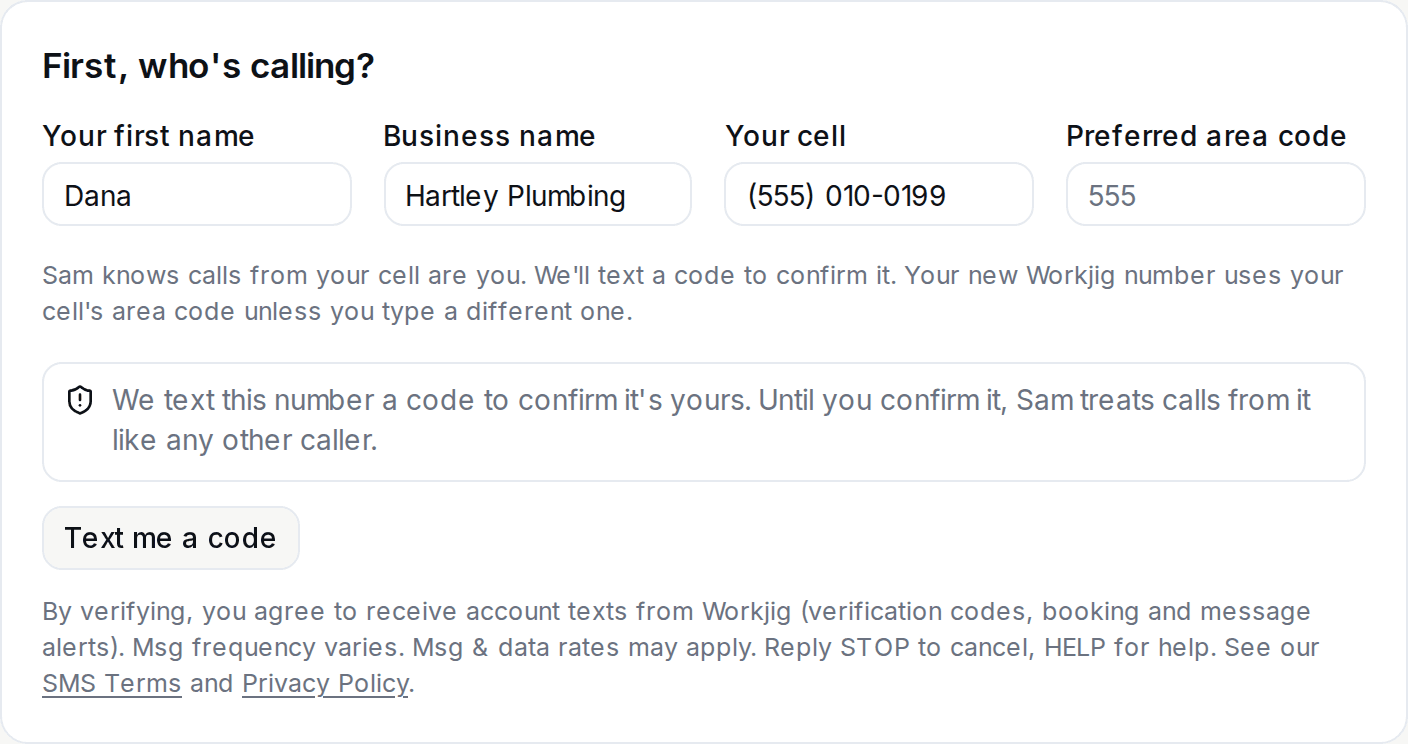
The Pro then enters the 6-digit code from the text. Pros receive verification codes, booking and message alerts, and account notices.
2. Customers, on a call
When a customer calls a business that uses Workjig, the Workjig assistant answers. Consent is spoken, on a recorded call:
- The call opens with:
This call is being recorded.
The assistant books the job. Once the time, name and address are settled, it asks exactly this, naming the business called:
- Assistant
- “Can Rivera Plumbing text you about this job? That includes confirmations, updates, invoices and a review request afterward. Message and data rates may apply, and you can reply STOP anytime.”
- Caller
- “Yes.”
The consent question, word for word, for a business called Rivera Plumbing. - Only an explicit yes from the caller is recorded as consent, and only for the line the customer is calling from. A no is recorded as a no, and without a yes nobody new is texted. A customer the business adds itself is not texted until that customer says yes on their own call or texts us to opt in.
- We keep the time of the yes and the call it was given on. The call recording is the evidence.
The text that follows is the booking confirmation, which names Workjig and ends with the opt-out instruction:
Hi Jordan, your drain cleaning with Rivera Plumbing is confirmed for Thursday, October 15 at 10:00 AM. Address: 123 Main St, Springfield Questions? Reply here or call (555) 010-0123. Sent via Workjig. Reply STOP to opt out.
A sample booking confirmation, generated from the real message template for a fictitious booking.
Customers receive appointment confirmations and reminders, reschedule and cancellation notices, job updates and replies about their booking, invoices and receipts, and, after a completed job, one request to review the business. No other promotional messages are sent.
3. By text
Opting in
A customer who opted out can opt back in by texting START or UNSTOP to the Workjig number that texts them. The reply confirms it and names the review request:
Rivera Plumbing via Workjig: you're signed up for job texts, including a review request after each job. Msg frequency varies. Msg & data rates may apply. Reply HELP for help, STOP to opt out.
Customers receive appointment confirmations and reminders, reschedule and cancellation notices, job updates and replies about their booking, invoices and receipts, and, after a completed job, one request to review the business. No other promotional messages are sent.
Opting out
Texting STOP, STOPALL, UNSUBSCRIBE, CANCEL, END, QUIT, OPTOUT or REVOKE opts the number out. It receives one confirmation and no further messages from that number.
Help
Texting HELP or INFO returns help information. You can also email support@workjig.com.
Rates and privacy
Message frequency varies. Message and data rates may apply. Consent is not a condition of buying any goods or services. Mobile numbers and consent are handled as described in our Privacy Policy and are never shared with third parties for marketing.